
Download ColoringBookAI – AI‑Powered Custom Coloring Pages Generator
Overview
ColoringBookAI is a cutting‑edge web application that lets anyone create custom coloring pages in seconds. Powered by artificial intelligence, the tool transforms a simple text prompt into a high‑resolution PNG line‑art image that’s ready to print, share, or edit. Whether you’re a parent looking for fresh, educational worksheets for your child, a teacher aiming to spice up lesson plans, an artist seeking quick line drawings for sketching, or a craft enthusiast who loves DIY projects, ColoringBookAI adapts to your needs without demanding any artistic skill.
The interface is deliberately minimalistic: type a description, adjust a few sliders to set complexity, click “Generate,” and the AI produces a clean, printable page that can be downloaded instantly. Because the output is a lossless PNG, the line work remains crisp at any size, making it ideal for both small handheld coloring books and large poster‑size prints. The service runs entirely in the browser, so there’s no need to install heavyweight software, and the generation process is secured with HTTPS encryption to protect user data.
With regular updates that expand the AI model’s vocabulary and style range, ColoringBookAI stays fresh, offering new possibilities for seasonal themes, holiday designs, or niche subjects like “space dinosaurs” or “Victorian gardens.” In short, it’s a free‑to‑try, secure, and endlessly creative tool that democratizes the art of coloring page creation while also providing a platform for educators to develop custom curriculum‑aligned materials without the usual design bottlenecks. The combination of instant results, cross‑platform accessibility, and a generous free tier makes it a compelling option for anyone who values speed, quality, and flexibility in generating printable art.
Key Features & How It Works
- AI‑Generated Line Art: Enter any descriptive prompt (e.g., “underwater city” or “autumn forest”) and the neural network produces a unique black‑and‑white illustration.
- High‑Resolution PNG Output: Download files at 300 dpi or higher, ensuring sharp edges for both small books and large prints.
- Complexity Slider: Control the amount of detail – from simple shapes for toddlers to intricate patterns for adult coloring enthusiasts.
- Instant Download: Generated images appear in a download queue; one click saves the PNG to your device.
- Cross‑Platform Access: Runs in any modern browser on Windows, macOS, Linux, Android, and iOS without extra plugins.
- Secure & Private: All prompts are processed over encrypted connections; no personal data is stored after the session ends.
- Free Tier with Premium Upgrade: Unlimited basic generations per day; a modest subscription unlocks higher resolution, batch generation, and commercial‑use rights.
How the AI Generates Your Page
When you type a prompt, the system forwards the text to a cloud‑based diffusion model trained on millions of line‑art examples. The model interprets the semantic meaning, extracts key visual elements, and composes a vector‑based outline. This outline is rasterized into a PNG with clean, 1‑pixel strokes that are perfect for coloring. The entire pipeline typically completes within 5–10 seconds, depending on server load. Because the service is hosted, you never need to worry about GPU requirements or software updates – the heavy lifting happens on the provider’s servers.
For educators, the “Classroom Mode” lets you generate a series of related pages (e.g., a whole lesson on marine life) with a single prompt plus a numeric suffix. Artists can copy the PNG into illustration programs like Adobe Illustrator or Procreate to add color layers, while crafters can print the designs on vinyl, fabric, or cardstock for custom projects. The flexibility of the prompt system means you can experiment with style descriptors (“zany cartoon,” “realistic sketch,” “mandala pattern”) to guide the AI toward a specific aesthetic. Advanced users can also leverage the API (available to premium subscribers) to integrate ColoringBookAI into learning management systems, creating automated worksheets that adapt to student progress.
Installation, Compatibility & Usage Instructions
ColoringBookAI is a web‑based SaaS, so there’s nothing to install on your computer. Simply open your preferred browser (Chrome, Firefox, Edge, Safari, or Brave) and navigate to coloringbookai.example.com. The site automatically detects your operating system and adjusts the UI for optimal touch or mouse interaction. Because it runs in the browser, the tool is compatible with the following platforms:
- Windows 10 and later
- macOS 10.14 (Mojave) and later
- Linux distributions with a modern web browser
- Android 8.0 (Oreo) and later
- iOS 13 and later (iPhone, iPad)
Step‑by‑Step Guide
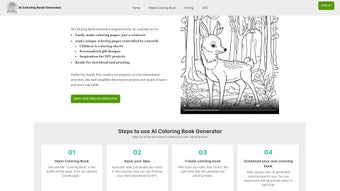
- Open the site: Visit the URL and click “Start Generating.” No account is required for the free tier.
- Enter your prompt: Type a description of the scene you want (e.g., “magical forest with friendly elves”).
- Adjust settings: Use the “Complexity” slider to set detail level; choose “Style” if you prefer cartoon, realistic, or mandala.
- Generate: Press the “Create” button. The AI processes your request and displays a preview within seconds.
- Download: Click the “Download PNG” button. The file saves to your default download folder.
- Print or edit: Open the PNG in any image viewer, print directly, or import into a drawing app for further customization.
Tips for Best Results
• Keep prompts concise but descriptive – “sailing ship on a stormy sea, simple lines” works better than a long paragraph.
• Use the “Style” dropdown to steer the AI toward the desired look; for kids, select “Simple Cartoon,” for adults, try “Intricate Mandala.”
• If you need multiple pages on a theme, reuse the same base prompt and change only the subject (e.g., “space robot,” “space alien”).
• For large prints, choose the “High‑Resolution” option in the premium plan to avoid pixelation.
• Clear your browser cache occasionally to ensure you always receive the latest model updates and feature enhancements.
Pros & Cons, Frequently Asked Questions & Conclusion
Pros
- Instant, high‑quality line art without any artistic skill.
- Works on all major operating systems and devices.
- Secure, browser‑based with no software installation.
- Free tier offers unlimited daily generations for casual users.
- Customizable complexity and style options.
- API access for educators and developers on premium plans.
Cons
- Premium features (batch export, commercial license) require a subscription.
- Generation speed depends on server load; occasional delays during peak times.
- Limited offline capability – internet connection is mandatory.
- Advanced styling may require trial‑and‑error with prompt wording.
- Free tier does not include commercial usage rights.
Frequently Asked Questions
Is ColoringBookAI really free to use?
Yes, the basic version is completely free and allows unlimited daily generations. A paid subscription unlocks higher resolution, batch processing, and commercial‑use rights.
Can I use the generated images for commercial projects?
Commercial usage is permitted only with a premium subscription that includes a commercial license. The free tier is limited to personal and educational use.
What file format does the tool provide?
The output is a high‑resolution PNG file with a transparent background, ideal for printing or further editing.
Do I need a powerful computer to run ColoringBookAI?
No. All processing happens on the cloud, so any device that can run a modern browser will work fine.
How secure is my data and my prompts?
All communications are encrypted via HTTPS. Prompts are not stored permanently; they are deleted after the generation session ends.
Is there an API for developers?
Yes, premium subscribers gain access to a RESTful API that lets you integrate ColoringBookAI generation capabilities directly into LMS platforms, mobile apps, or custom workflows.
Conclusion & Call to Action
ColoringBookAI fills a unique niche at the intersection of AI creativity and educational fun. By removing the barrier of artistic skill, it empowers parents, teachers, artists, and hobbyists to produce personalized coloring pages in seconds. The web‑based, secure platform ensures accessibility across all major operating systems, while the free tier makes it easy to experiment before committing to a premium plan. If you’re looking for a fast, reliable, and flexible way to generate custom line art for printables, classroom activities, or personal projects, ColoringBookAI is a standout choice. Download ColoringBookAI today, try the free version, and unleash a world of coloring possibilities for yourself and your community.
ColoringBookAI makes it effortless to produce unique coloring sheets for my classroom. The AI is fast, the images are crisp, and the free tier is generous. The premium upgrade adds valuable batch features for larger projects.
Pros
- Instant generation
- High‑resolution output
- Cross‑platform web app
- No installation required
- Secure and private
Cons
- Requires internet
- Premium needed for commercial use
- Occasional latency during peak times



.png)



